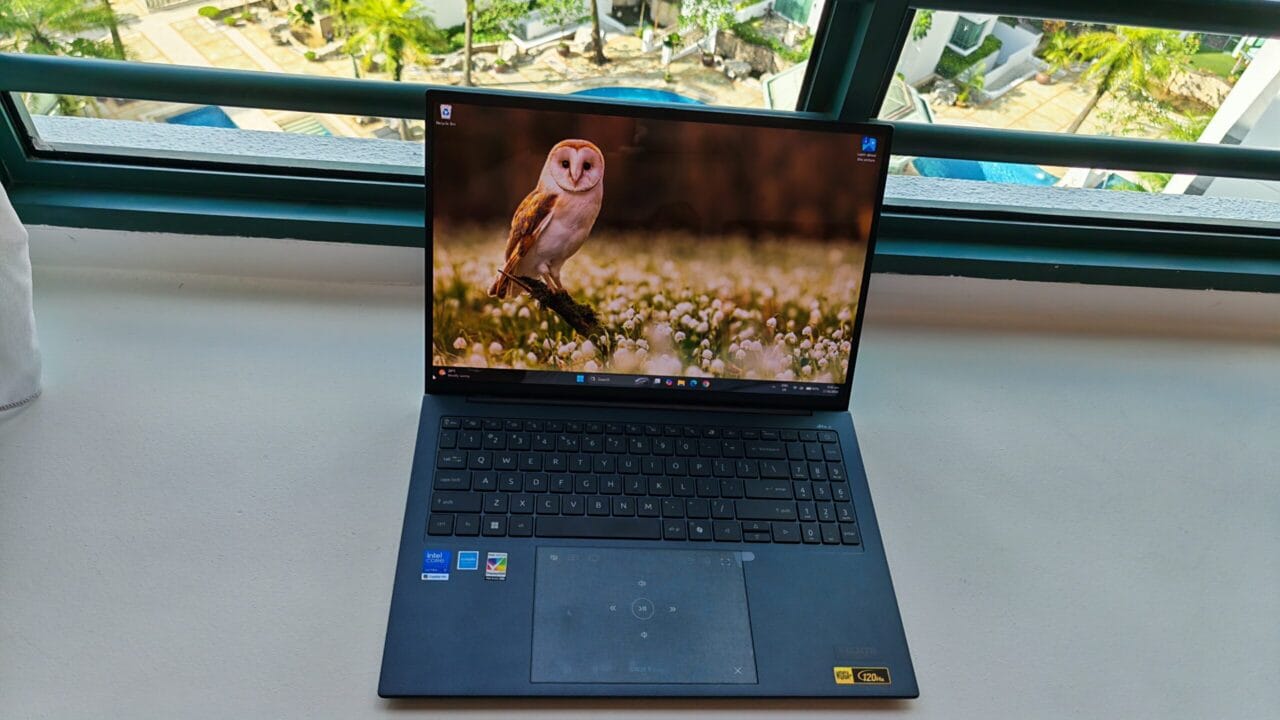
At a glance
Acer Swift Edge 16 (2026)
Who it is for
A premium 16-inch ultraportable laptop that combines an ultra-light design, stunning OLED display and exceptional battery life for productivity on the go.
Professionals, frequent travellers and students who prioritise portability, a large display and all-day battery life over graphics performance.
Gamers, content creators or power users who need strong graphics performance for demanding games, video editing or 3D workloads
How it scores
Tested configuration
- CPU Intel Core Ultra (Series 3) 7 355
- Graphics Integrated Intel Graphics
- Display 16-inch 2880x1880 OLED screen
- RAM 32GB
- Storage 1TB
- Weight 1.19kg
I bought the original Acer Swift Edge when it launched in 2022 — which I am still using today as my trusted aide, including for writing this review.
At 1.17kg, it was billed as the world’s lightest 16-inch OLED laptop at that time. It has been my loyal companion and workhorse for the last four years.
Last year I replaced the ageing battery. I cracked the screen a few months ago and sent it for repair to stretch the dollar, as laptop prices today have increased 20-30 per cent because of component (RAM) shortages.
So, when I was given the opportunity to review the latest (probably 4th generation) version of the Swift Edge, I grabbed the chance. After testing it for a few weeks, the simple takeaway for me is that it is the improved version of an already amazing thin-and-light laptop. Long battery life, thin, light, 3K OLED display, full-sized keyboard and durable, it has everything I am looking for in a modern thin-and-light laptop for daily work.
If this were 2022, this review would have been simpler. But now, with new laptops sporting processors with gaming-grade integrated graphics, the choice is harder. In the past, there were clearly two separate categories: thin, light, long-battery-life laptops for office productivity folks who want portability, and thicker, heavier, battery-guzzling laptops for gamers who demand performance over everything else.
Intel Panther Lake processors lets you have your cake and eat it too
Driving this revolution are the new Intel Core Ultra 3 series (“Panther Lake”) processors, which can offer both portability and good-enough gaming performance in one suit. An obvious comparison is against the Acer Swift Go 16 (2026), reviewed here, which makes use of the X7 series of the Panther Lake vs the Panther Lake processor in this laptop which is also a 7 series, but without the X. It’s all complicated nomenclature for us ordinary consumers, but simply put, the X in the processor model name means it has the improved integrated graphics chip.
The absence of the Intel Arc B390 graphics (the “X” factor) in the laptop reviewed here has a significant impact. While the Acer Swift Go 16 (2026) offered both portability and good-enough gaming performance, this Acer Swift Edge 16 (20206) clearly lacks the oomph for hack-and-slash.
Playing Diablo IV at medium settings at the laptop’s native 2880×1880 resolution only delivered an average of 18 fps, way below the 30 fps score that gamers need.
FPS stands for frames per second, the number of frames the game refreshes in one second. The human eye cannot really see improvements beyond 30fps, and below 25 fps the game will lag. The reason higher frame rates than 30 fps matter is because you want to get consistent frame rates (which go up and down depending on how busy your screen is at the point in time) throughout the game – that is why sometimes, demanding gamers aim for 40 fps or even 50-60 fps average frame rates.
Turning on Intel XeSS technology improved the frame rates to an average of 29 fps, which makes the game much smoother. Intel XeSS is an AI-powered upscaling technology that renders games at a lower internal resolution before intelligently reconstructing them to the display’s native resolution, boosting frame rates while maintaining image quality close to
native rendering. But XeSS is not perfect, and when the game requires constant movement and actions, the gameplay sometimes feels odd.
Compare this to the Swift Go 16, which delivers a sterling 40fps average for Diablo IV at the same medium settings, native resolution, without XeSS.
So the conclusion is simple: if you want your ultrabook to handle games respectably, the Swift Edge 16 is not for you.
The Acer Swift Edge 16 has the edge in portability
In all of our standard battery life tests, the Swift Edge 16 outperformed the Swift Go 16. In our web browsing test, where we run a script that simulates browsing on multiple websites, the Swift Edge lasted an impressive 13 hours 5 mins, compared to 8 hours 22 mins on the Swift Go 16 — a very respectable 50 per cent improvement.
Also, at 1.19kg, it is 0.17kg lighter than the Swift Go 16. It’s hard to explain the numbers unless you use these laptops frequently. In my view, the Swift Go 16 is already light enough at 1.36kg, as most 16-inchers weigh 1.5kg and up. But at 1.19kg, this 16-incher is going to be as light, if not lighter than your average 14-inch laptops.
After using it for several weeks, I often had to remind myself that I was carrying a full-sized 16-inch notebook. That’s the Swift Edge’s biggest achievement. Rather than asking buyers to choose between screen size and portability, Acer has shown that you can have both.
The latest model combines Intel’s new Core Ultra (Series 3) 7 355 processor, 32GB of RAM, a 1TB SSD and a vibrant 3K OLED display into a laptop aimed squarely at professionals, executives, students and frequent travellers.
Design + Features
Well-balanced and light
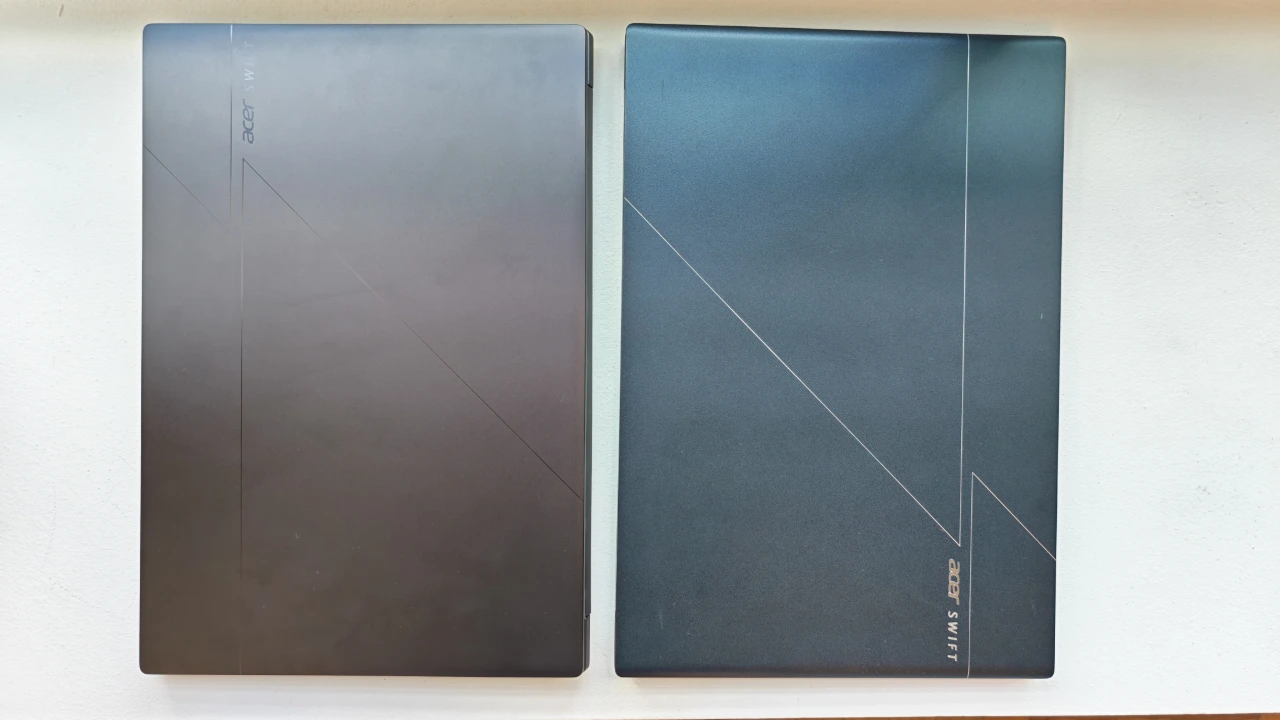
The Swift Edge 16 looks like a twin of the Swift Go 16.
The design is very similar, with some minor differences. The Edge is slightly thinner at 14.6mm thick with the lid closed (vs 15.7mm for the Swift Go 16) and feels like you are holding a document folder instead of a traditional laptop. It also bears the same etched geometric accents on its lid, except that for the Edge, the laser-cut detailing is clearly visible.
The lid is made of lightweight stainless steel-magnesium alloy and has a polish that exudes a premium finish. The keyboard deck and palm rest are made from magnesium-aluminium alloy that offers sturdiness to balance the lightweight.
Many ultra-light laptops sacrifice chassis rigidity in pursuit of lower weight, and some end up feeling flimsy or awkwardly balanced. The Swift Edge avoids both pitfalls. The magnesium-aluminium alloy chassis feels reassuringly solid, while the evenly distributed 1.19kg weight makes the laptop feel remarkably natural to carry despite its generous 16-inch display.
The Swift Edge’s cooling vents are neatly concealed within the rear hinge, making them almost invisible unless you’re specifically looking for them. It’s an elegant design that preserves the laptop’s clean, minimalist appearance while serving an important purpose: directing hot air away from the user.
The placement also improves day-to-day usability. Some laptops vent hot air through the sides, where it can blow directly onto your hand while using an external mouse. By exhausting heat through the rear hinge instead, Acer avoids this annoyance, making the Swift Edge more comfortable to use during long work sessions.
High-resolution OLED display that opens a full 180 degrees
The Swift Edge is equipped with a stunning 3K (2880×1880) WQXGA+ OLED display that delivers exceptional sharpness, vibrant colours and deep contrast. Whether you’re watching high-resolution videos, editing photos or playing games, the display is a joy to use.
The higher resolution is especially rewarding on a 16-inch display. Compared with a 14-inch laptop, the larger screen makes the extra pixels far more noticeable. Spreadsheets, webpages and documents look cleaner, while movies appear sharper and more immersive. A 16-inch is especially useful for users who want to look at two open documents side-by-side.
My only gripe is Acer’s decision to use a glossy display. I personally prefer the matte finish found on the original 2022 Swift Edge.
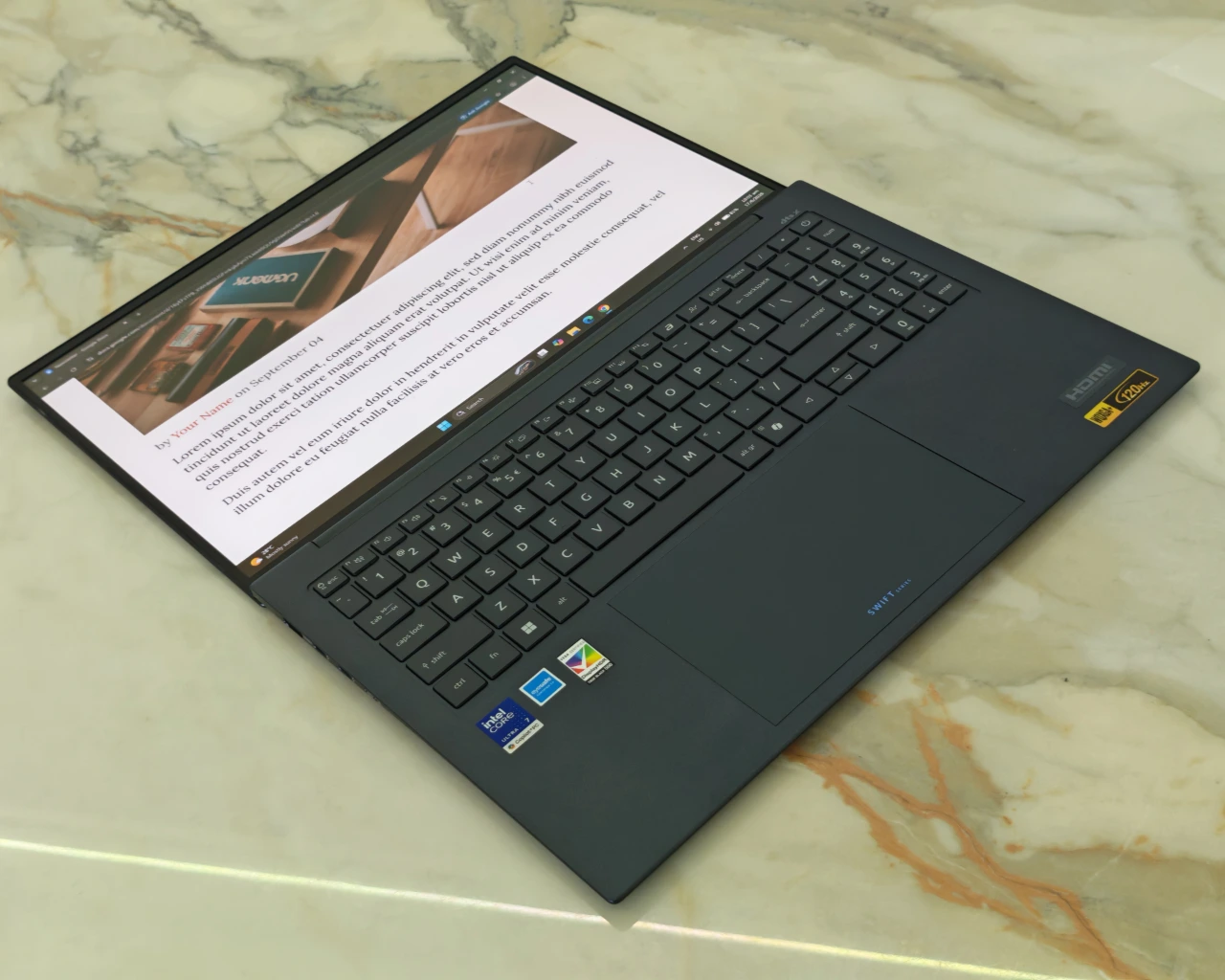 The Swift Edge’s display opens a full 180 degrees, allowing it to lie completely flat. It makes sharing content much more natural, whether you’re presenting slides to a client across a café table, reviewing a document with a colleague during a meeting, or showing photos and videos to friends. Instead of awkwardly turning the entire laptop, you can simply lay the display flat for a better viewing angle.
Slim bezels complete the package, maximising screen real estate while giving the Swift Edge a clean, modern appearance.
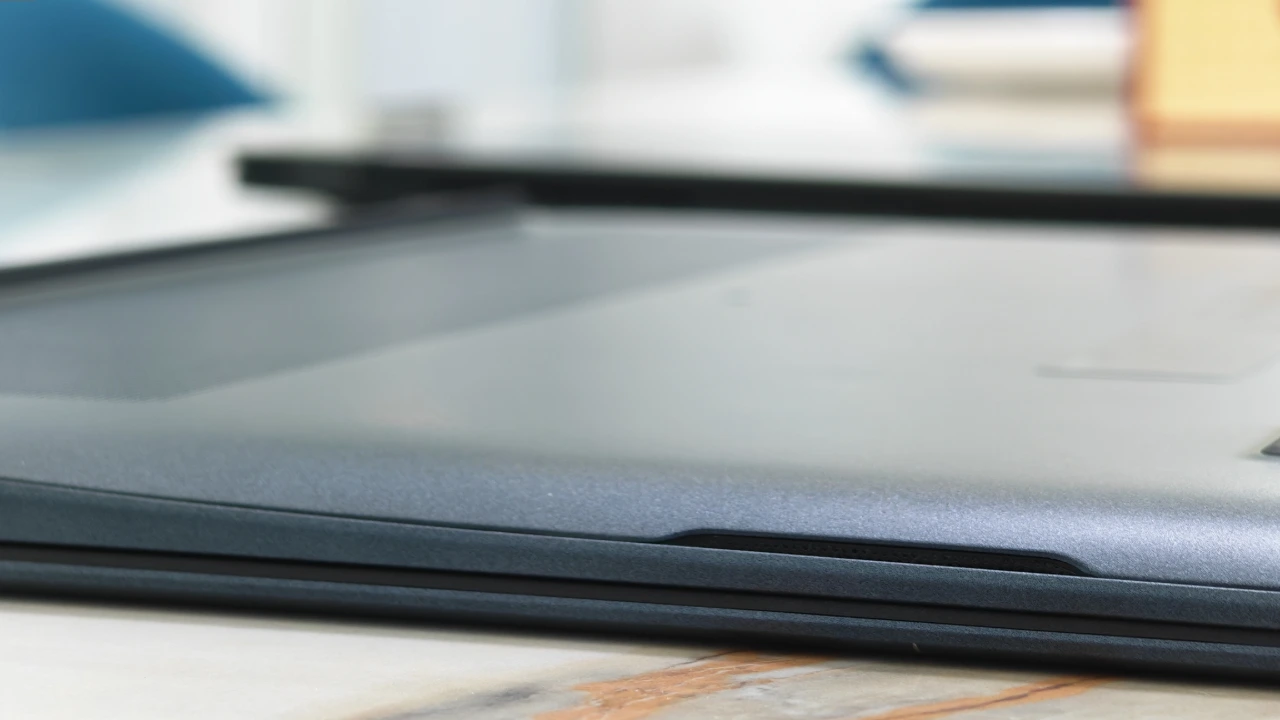
Side-firing speakers for more oomph
The Swift Edge features horizontally firing speakers on both sides of the chassis, delivering louder, fuller and more direct sound than the downward-firing speakers on my 2022 Swift Edge.
Audio comes through with greater clarity and presence, avoiding the slightly muffled effect that can occur when sound is projected onto a desk before reaching your ears.
I normally use an external speaker for Zoom calls with the Swift Edge; the built-in speakers are good enough that I rarely felt the need to reach for it.
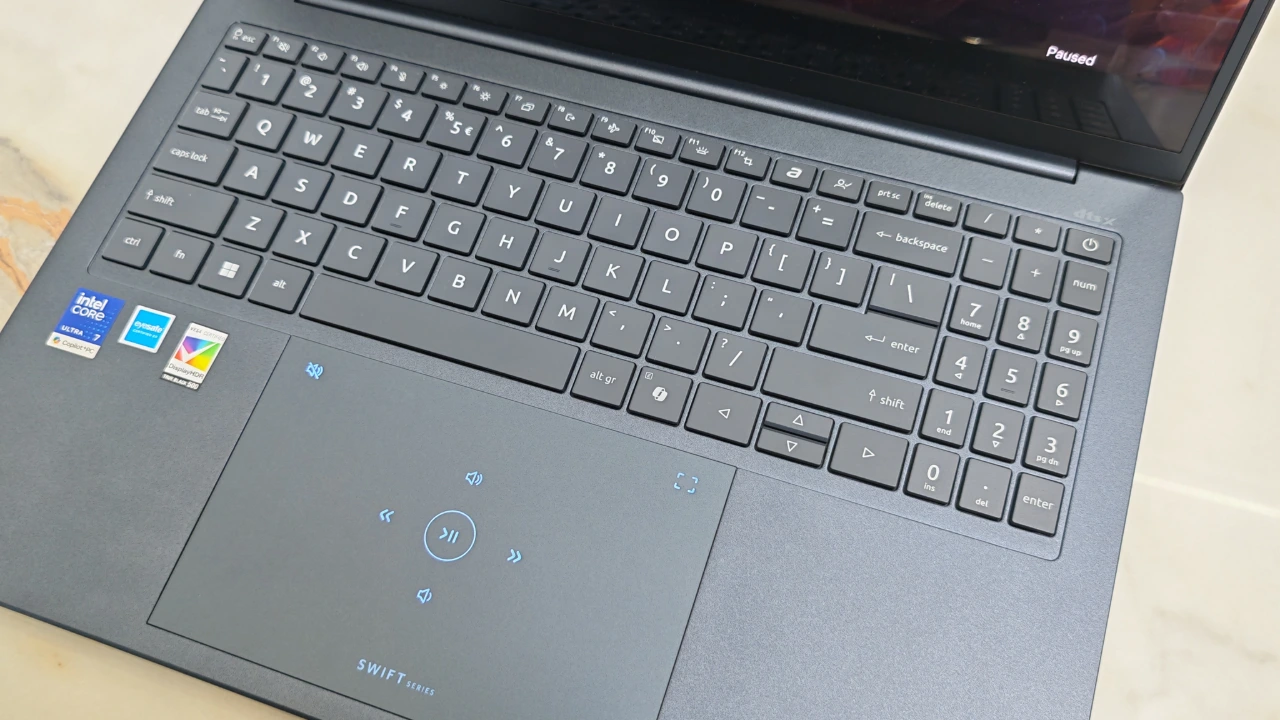
Full-sized keyboard and trackpad — but no fingerprint ID
Acer has made excellent use of the available space on the Swift Edge. Despite its slim chassis, it accommodates a full-sized keyboard, a large touchpad and a dedicated number pad. The backlit keyboard offers good key travel and tactile feedback, making it comfortable for extended typing sessions.
The only compromise is the number pad. To fit within the laptop’s compact chassis, Acer has slightly narrowed some of the keys, making it feel a little more cramped than a full-sized desktop numpad. It’s still perfectly usable for occasional number entry, though heavy spreadsheet users may need a short adjustment period.
The oversized touchpad also incorporates touch-enabled media controls, providing convenient shortcuts for adjusting playback and volume.
One feature I miss is a fingerprint reader. My 2022 Swift Edge had one neatly integrated into the power button, making it quick and convenient to unlock the laptop. This model relies solely on Windows Hello facial recognition or a PIN for secure sign-ins. Facial recognition works well, but having both biometric options would have been a welcome addition.
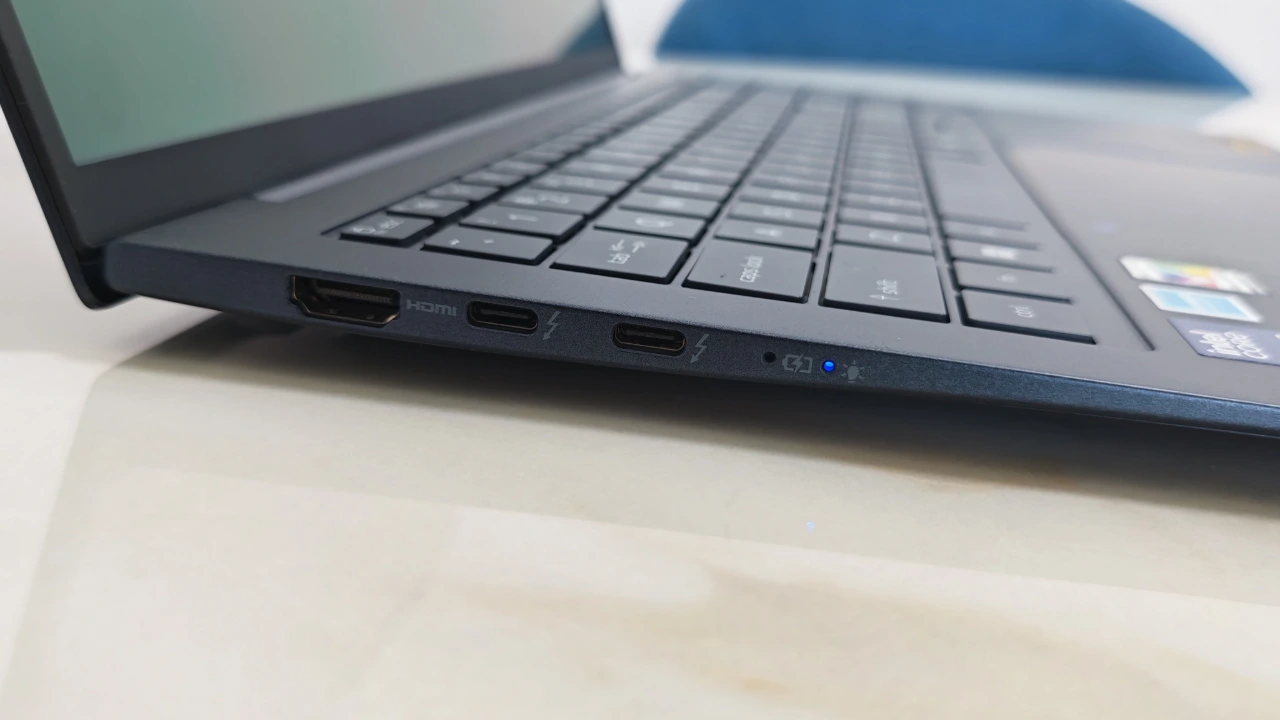 Connectivity is another highlight. The Swift Edge includes two Thunderbolt 4 USB-C ports, an HDMI 2.1 port, two USB-A ports and a 3.5mm audio jack, giving you plenty of options without relying on dongles.
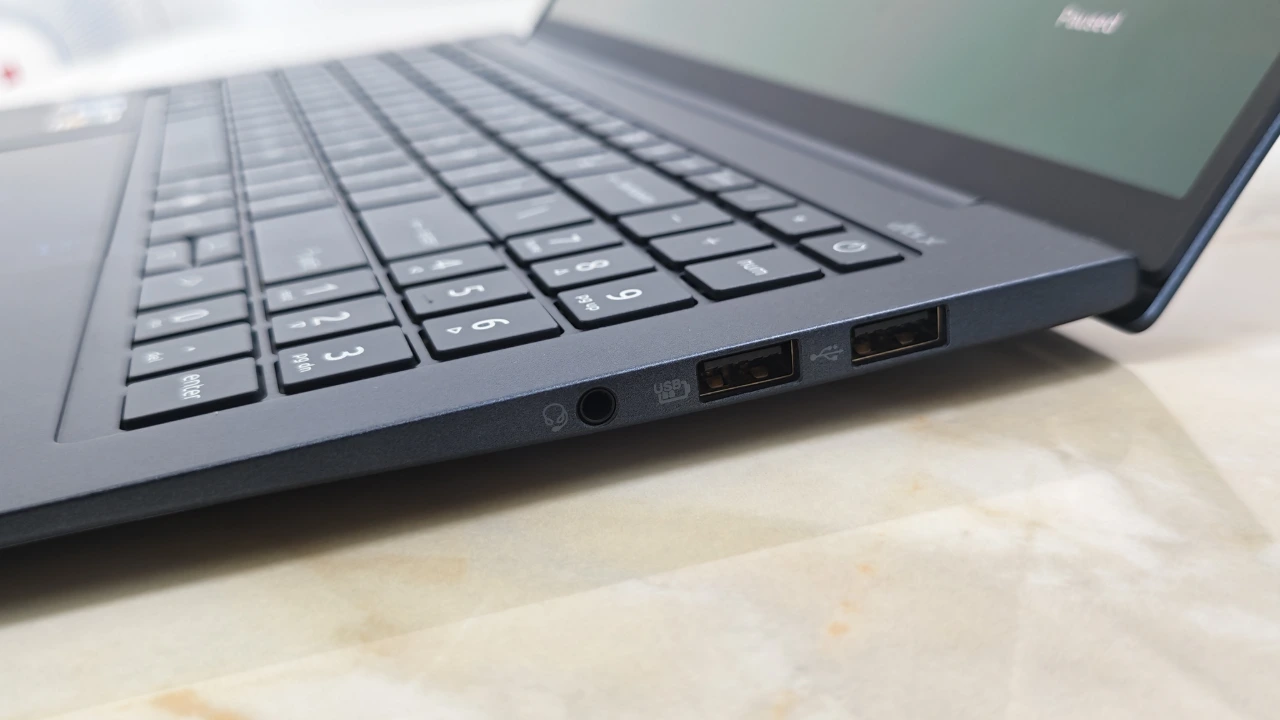 The twin Thunderbolt 4 ports are particularly versatile, allowing you to charge the laptop through one port while using the other for an external display or high-speed storage. If your monitor supports USB-C with Power Delivery, a single cable can handle both charging and video output, leaving the second Thunderbolt port free for another accessory.
Wireless connectivity is equally up to date, with support for Wi-Fi 7.
Portability + Battery Life
Thin, light and long battery life are the hallmarks of a good ultraportable laptop for work. In this category, the Swift Edge 16 shines bright. At just 1.19kg, this is definitely one of the lightest 16-inchers in the market.
Just like the Swift Go 16, the weight distribution here is very well balanced. The centre of gravity sits almost perfectly in the middle of the laptop, so when I lifted it with my fingers, the balance point felt naturally centred rather than front- or rear-heavy. That may sound like a small detail, but it makes the laptop feel lighter and more comfortable to carry around in everyday use. If you have ever held an unbalanced laptop, you will know what I mean.
The battery life is impressive. It lasted 13 hours 5 minutes in our web browsing test, where we run a Python script to simulate the browsing of popular websites until the battery is completely drained. That is about 50 per cent more juice compared to the already capable Swift Go 16.
In our video test, where we loop an offline video until the battery dies, it lasted 14 hours 30 minutes, a significant improvement over the 10 hours 52 minutes achieved by its sibling, the Swift Go 16.
The Swift Edge 16’s longer battery life reflects the different priorities of the two Panther Lake processors. Its Core Ultra 7 355 uses half as many CPU cores and a much smaller integrated GPU than the Swift Go 16’s Core Ultra X7 358H. The X7 delivers substantially greater processing and graphics performance, but the leaner 355 places less demand on the battery during everyday work and video playback.
The processor is not the only factor: battery capacity, display consumption, cooling and Acer’s power management also affect runtime. Nevertheless, the results illustrate the fundamental trade-off—greater endurance from the Swift Edge and greater performance from the Swift Go.
In practical terms, this is the kind of laptop you can comfortably bring to the office, use throughout a full workday for meetings, browsing, writing and media consumption, and still not have to worry about reaching for the charger.
Performance
Gaming isn’t the Swift Edge 16’s forte. Less demanding games such as Slay the Spire 2 run comfortably, but even moderately intensive titles push the integrated graphics beyond its comfort zone.
A good example is Diablo IV. In our regular benchmark, we ran a busy Infernal Hordes encounter at the laptop’s native resolution using medium settings. Without XeSS, the game struggled at an average of just 16fps, making combat feel noticeably sluggish. Enabling XeSS upscaling boosted performance to 29fps, a significant improvement that made the
game far more playable. However, the experience wasn’t entirely smooth, as the upscaling occasionally introduced visual artefacts or inconsistent frame pacing that made gameplay feel a little unnatural.
Reducing the resolution to 1920×1080 at medium settings (XeSS turned off) improved the average frame rate to 25fps. However, because the game doesn’t scale to fill the display, it runs in a much smaller window, making the improvement less useful in practice.
Cyberpunk 2077, long regarded as one of the toughest tests for PC hardware, proved an even greater challenge. The Swift Edge 16 stuttered through the built-in benchmark, averaging just 11fps at medium settings with XeSS disabled. Turning on XeSS doubled performance to 23fps, but the game remained far from playable.
While the Swift Edge 16 lacked the performance for demanding games, it more than made up for it with exceptional endurance, even during gaming.
After a 30-minute session of Diablo IV, the Swift Edge 16 still had 73% battery remaining, compared with around 59% on the Swift Go 16 under the same test. The gap widened further in Slay the Spire 2, with the Swift Edge 16 retaining 92% battery after 30 minutes versus 84% on the Swift Go 16. For users who value battery life over frame rates, the Swift Edge 16 has a clear advantage.
Test results
These figures are from the tested configuration and should be read as practical reference points, not universal results. Battery life and frame rates will vary with brightness, settings, workload and power mode.
Battery life
| Test | Result | Takeaway |
|---|---|---|
| Web browsing | 13h 5m | Outstanding battery life makes this a real all-day work companion |
| Offline video playback | 14h 30m | |
| Battery drain (Diablo IV) | 73% after 30 m | |
| Battery drain (Slay The Spire 2) | 92% after 30m |
Gaming performance matrix
| Game | Test condition | Key results | Takeaway |
|---|---|---|---|
| Diablo IV |
On battery |
| It struggles with graphically demanding games |
| Cyberpunk 2077 |
Plugged in |
|
Detailed results
Open this section for the full frame-rate ranges, settings and test conditions behind the gaming summary.
Diablo IV
| Resolution | Setting | Upscaling | Result |
|---|---|---|---|
| 2880 x 1800 | Low | XeSS Off | 16-22fps, avg 18 fps |
| 2880 x 1880 | Low | XeSS On | 31-38fps, avg 34fps |
| 2880 x 1880 | Medium | XeSS Off | 15-18fps, avg 16fps |
| 2880 x 1880 | Medium | XeSS On | 27-32fps, avg 29fps |
| 2880 x 1880 | High | XeSS Off | 11-15fps, avg13fps |
| 2880 x 1880 | High | XeSS On | 22-25fps, avg 23fps |
| 1920 x 1080 | Medium | XeSS Off | 23-30fps, avg25fps |
Cyberpunk 2077
| Resolution | Setting | Upscaling | Result |
|---|---|---|---|
| 2880 x 1880 | Medium | XeSS Off | 10-12fps, avg 11fps |
| 2880 x 1880 | Medium | XeSS On | 20-27fps, avg 23fps |
| 1920 x 1080 | Medium | XeSS Off | 20-29fps, avg 24fps |
| 1920 x 1080 | Medium | XeSS On | 33-47fps, avg 39fps |
Frame-rate ranges reflect observed variation during testing. Average figures are included to make the results easier to compare.
Verdict
Acer Swift Edge 16 (2026)
The Acer Swift Edge 16 is built for work, not play. Its featherweight design, vibrant 16-inch OLED display and outstanding battery life make it one of the most compelling premium productivity laptops for professionals who are always on the move.
- Pros ultra-light 1.19kg design, superb OLED display, outstanding battery life, excellent productivity performance
- Caveats integrated graphics struggle with demanding games and GPU-intensive workloads, no fingerprint reader, cramped numeric keypad